
UniPlayer Pro- Player&Editor1.1.9 - Google Play
You'll be able to see results in few seconds.
Publisher Description
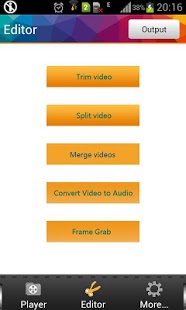
UniPlayer is all-in-one videoTool, make you playing, organizing, editing videos so easy.
UniPlayer Pro is the ad-free, commercial version of UniPlayer application. Before buying UniPlayer Pro, we suggest you to try free version first.
Attention(2013-07-25):
Fix the crash bug when open edit. Please update!
Main features:
(Player features):
- Play all formats of videos
- Organize videos so easily, search/rename/delete videos on the phone
- Hide your videos to 'private video list'
(Editor features):
- Trim your videos
- Delete select parts of videos
- Split your videos into two clips
- Merge multiple videos into one file( As large as 1 hous video can be merge! )
- Convert video to audio files(Uniplayer is the first app support 2 modes: Direct output as AAC/AMR; Convert to MP3 File )
- Grab video frames
- Share your clips to Youtube, Facebook,etc
- Rename and delete your clips
If you see any problems, please send email to uniplayer@qq.com or
report on website http://www.movisoftware.com
UniPlayer uses FFmpeg under permission of LGPL.
We are working hard everyday to add new features to UniPlayer, so UniPlayer is always up to date, and it will be the most useful and easy All-In-One Media Player/Editor in Goole Play.
Version log:
1.18 2013.07.14
fix frame grab error when 176*144, 240*320 video
fix exsdcard storage error
1.17: 2013.06.01
fix select second file to merge
fix blurry thumbnail
1.15: 2013.05.08
fix video edit crash on Samsung Galaxy S2/S3
1.13: 2013.04.20
remove copyrighted images
1.11: 2013.04.14
fix clip rename bug
1.10: 2013.04.14
add chn language support
1.09: 2013.04.13
ARMV5 CPU supported.
Support sharing media to youtube/facebook
fix admob crash bug. fix other serious bugs. More stable.
Optimization of the thumbnail images loading.
version 1.08: 2013.04.07
Support Video to Audio files
Support Grab video frames
1.06: 2013.03.09
Fix crash bug in player listview
Fix some language support
1.04:2013.03.04
Fix video split bugs.
Fix merge bugs.
Fix other important bugs
1.0.1:
Fix crash bug on some devices
1.0.0:
- First version released
Keywords:
uniplayer, uniplayer pro, video player, vplayer, moboplayer, video editor, video trimmer, androvid, vidtrim, video cutter, cut video, video trimmer, trim, sort videos, video splitter, split videos, merge videos, video merge, video trim, video edit
About UniPlayer Pro- Player&Editor
The company that develops UniPlayer Pro- Player&Editor is MoviSoftware Studio. The latest version released by its developer is 1.1.9.
To install UniPlayer Pro- Player&Editor on your Android device, just click the green Continue To App button above to start the installation process. The app is listed on our website since 2013-07-25 and was downloaded 0 times. We have already checked if the download link is safe, however for your own protection we recommend that you scan the downloaded app with your antivirus. Your antivirus may detect the UniPlayer Pro- Player&Editor as malware as malware if the download link to com.energysh.elivetvpro is broken.
How to install UniPlayer Pro- Player&Editor on your Android device:
- Click on the Continue To App button on our website. This will redirect you to Google Play.
- Once the UniPlayer Pro- Player&Editor is shown in the Google Play listing of your Android device, you can start its download and installation. Tap on the Install button located below the search bar and to the right of the app icon.
- A pop-up window with the permissions required by UniPlayer Pro- Player&Editor will be shown. Click on Accept to continue the process.
- UniPlayer Pro- Player&Editor will be downloaded onto your device, displaying a progress. Once the download completes, the installation will start and you'll get a notification after the installation is finished.
Program Details
System requirements
Download information
Pricing
Version History
version 1.1.9
posted on 2013-07-25
version 1.1.6
posted on 2013-06-01
Several fixes and updates
Disclaimer
Official Google Play Link
We do not host UniPlayer Pro- Player&Editor on our servers. We did not scan it for viruses, adware, spyware or other type of malware. This app is hosted by Google and passed their terms and conditions to be listed there. We recommend caution when installing it.
The Google Play link for UniPlayer Pro- Player&Editor is provided to you by apps112.com without any warranties, representations or guarantees of any kind, so access it at your own risk.
If you have questions regarding this particular app contact the publisher directly. For questions about the functionalities of apps112.com contact us.
